Visual Paradigm Installation and User's Guide: Difference between revisions
From KKM-STUDIO-WIKI
More actions
No edit summary |
No edit summary |
||
| Line 1: | Line 1: | ||
'''READ ME FIRST''' | '''READ ME FIRST''' | ||
*This tutorial '''<span style="color: rgb(224, 62, 45);" >only</span> '''applies to the '''WINDOWS '''operating system, other operating systems have not yet been verified.<br> | *This tutorial '''<span style="color: rgb(224, 62, 45);">only</span> '''applies to the '''WINDOWS '''operating system, other operating systems have not yet been verified.<br> | ||
*This tutorial is based on this [https://www.visual-paradigm.com/support/documents/vpuserguide/12/3399/85188_activatingvi.html website] to make additions and changes. | *This tutorial is based on this [https://www.visual-paradigm.com/support/documents/vpuserguide/12/3399/85188_activatingvi.html website] to make additions and changes. | ||
*Contact Shuokai Ma ([mailto:s214919@student.dtu.dk s214919@student.dtu.dk]) if you find a problem or have suggestions for this Wiki. | *Contact Shuokai Ma ([mailto:s214919@student.dtu.dk s214919@student.dtu.dk]) if you find a problem or have suggestions for this Wiki. | ||
| Line 7: | Line 7: | ||
#Download the latest version of [https://www.visual-paradigm.com/download/ Visual Paradigm], and then install the Visual Paradigm by following the instructions of the installation wizard. | #Download the latest version of [https://www.visual-paradigm.com/download/ Visual Paradigm], and then install the Visual Paradigm by following the instructions of the installation wizard. | ||
#Start | #Start <span class="notranslate">Visual Paradigm. When you see the following screen, select '''Subscription/Academic License'''.[[File:Choose subscription 26064.png|300px|center|frame|Select Subscription / Academic License]]</span> | ||
#Expand | #Expand '''Academic ''''''Training Partner Program License'''. | ||
#Copy the activation code from DTU Learn (Under Content -> UML Modelling Tools -> Visual Paradigm Academic License). | #Copy the activation code from DTU Learn (Under Content -> UML Modelling Tools -> Visual Paradigm Academic License). | ||
#Paste the activation code to the textbox called Activation Code. And then enter your name and email address.[[File:Activation code 26065.png|300px|center|frame|Activating Visual Paradigm]] | #Paste the activation code to the textbox called Activation Code. And then enter your name and email address.[[File:Activation code 26065.png|300px|center|frame|Activating Visual Paradigm]] | ||
#Click | #Click '''Activate'''. You are prompted for an activation code. | ||
#Go to your email inbox and Check your new email for the verification code. | #Go to your email inbox and Check your new email for the verification code. | ||
#Copy the verification code and paste it to <span class="notranslate">Visual Paradigm</span>.[[File:Enter verification code 26066.png|300px|center|frame|Pasting the verification code]] | #Copy the verification code and paste it to <span class="notranslate">Visual Paradigm</span>.[[File:Enter verification code 26066.png|300px|center|frame|Pasting the verification code]] | ||
#Click | #Click '''OK '''to confirm. <span class="notranslate">Visual Paradigm </span>will be activated if the verification code is valid. | ||
= Creat your first project in Visual Paradigm = | |||
Revision as of 20:37, 9 February 2023
READ ME FIRST
- This tutorial only applies to the WINDOWS operating system, other operating systems have not yet been verified.
- This tutorial is based on this website to make additions and changes.
- Contact Shuokai Ma (s214919@student.dtu.dk) if you find a problem or have suggestions for this Wiki.
Download, Install And Activate Visual Paradigm
- Download the latest version of Visual Paradigm, and then install the Visual Paradigm by following the instructions of the installation wizard.
- Start Visual Paradigm. When you see the following screen, select Subscription/Academic License.
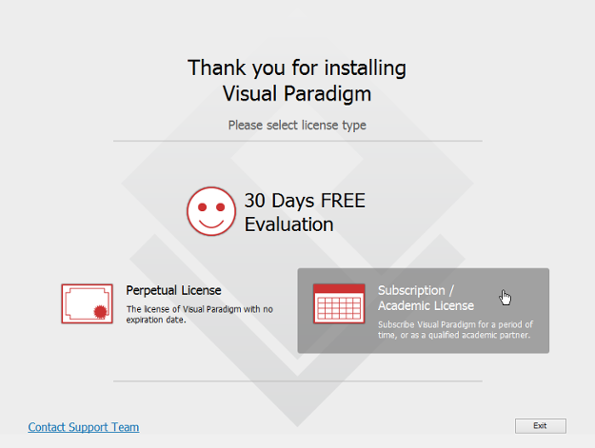
Select Subscription / Academic License - Expand Academic 'Training Partner Program License'.
- Copy the activation code from DTU Learn (Under Content -> UML Modelling Tools -> Visual Paradigm Academic License).
- Paste the activation code to the textbox called Activation Code. And then enter your name and email address.
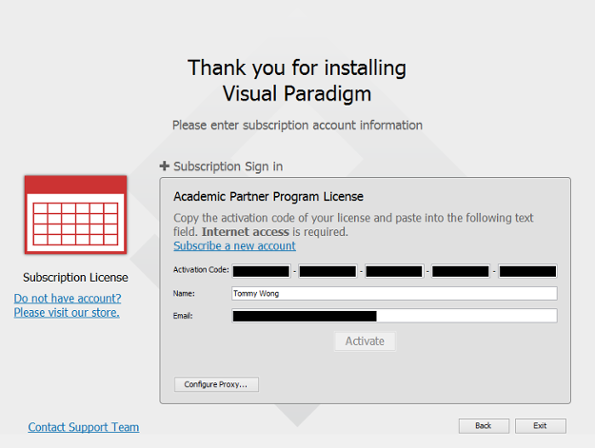
Activating Visual Paradigm - Click Activate. You are prompted for an activation code.
- Go to your email inbox and Check your new email for the verification code.
- Copy the verification code and paste it to Visual Paradigm.
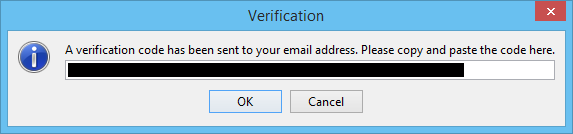
Pasting the verification code - Click OK to confirm. Visual Paradigm will be activated if the verification code is valid.


